APOSTLE
arrow_back AI for E-commerce
Module 01 Product Image Multiplication

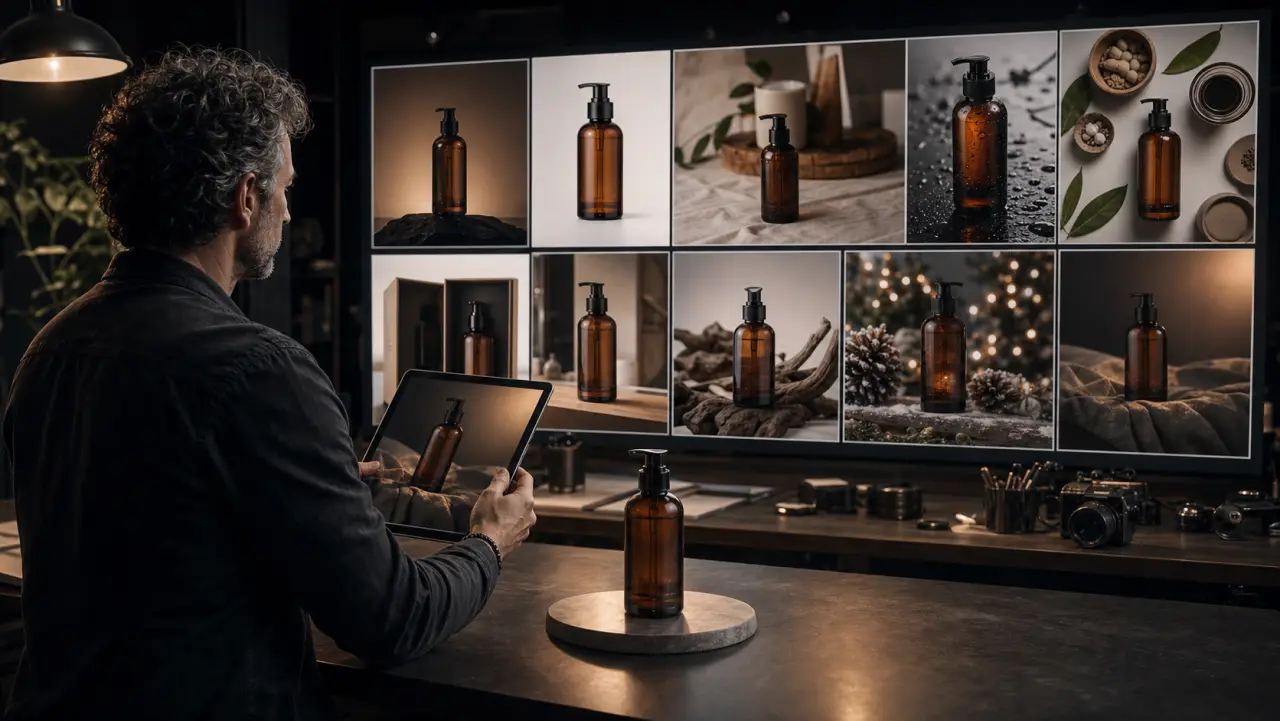
From One Photo to Ten AI Variants

Learn how to take a single product photo and generate an entire visual library — hero shots, detail close-ups, flat lays, seasonal variants, and marketplace-ready images using AI tools.

schedule 14 min
signal_cellular_alt Beginner
menu_book Lesson 01 of 4

Learning Objectives

By the end of this module, you will be able to:

  • Generate 10+ professional product image variants from a single product photo
  • Maintain absolute product accuracy (colors, labels, proportions) across all variants
  • Create platform-specific imagery optimized for Amazon, Shopify, Instagram, and TikTok Shop
  • Use both general-purpose AI tools and specialized e-commerce platforms
  • Build a repeatable product photography workflow that scales to your full catalog

The E-commerce Image Library Standard

Every product in your catalog needs a minimum set of images to compete. Here's the standard library, ranked by conversion impact:

THE 10-IMAGE PRODUCT LIBRARY

1. HERO SHOT — Product front-center, clean background, dramatic lighting
   Impact: Primary listing image. Determines click-through from search.

2. WHITE BACKGROUND — Pure white (#FFFFFF), marketplace-compliant
   Impact: Required by Amazon, eBay. Clean, professional baseline.

3. LIFESTYLE CONTEXT — Product in aspirational use environment
   Impact: Helps customer imagine ownership. Reduces returns.

4. SCALE REFERENCE — Product next to recognizable object (hand, mug, book)
   Impact: Sets size expectations. Reduces "smaller than expected" returns.

5. DETAIL CLOSE-UP — Macro shot of texture, craftsmanship, material
   Impact: Communicates quality. Justifies premium pricing.

6. IN-USE DEMONSTRATION — Hands interacting with product, showing function
   Impact: Answers "how does it work?" Increases confidence.

7. FLAT LAY — Overhead arrangement with complementary props
   Impact: Strong for social media (Instagram, Pinterest). Aspirational.

8. MULTI-ANGLE — 45°, side, back views of the product
   Impact: Answers "what does it look like from other angles?"

9. PACKAGING — Product in/with its packaging
   Impact: Sets unboxing expectations. Gift-purchase confidence.

10. SEASONAL VARIANT — Same product, seasonal context (holiday, summer, etc.)
    Impact: Fresh content without new shoots. Seasonal ad creative.

Traditionally, producing this library for a single SKU costs $500-2,000 in studio time, photography, retouching, and formatting. With AI, the marginal cost after the first product photo is near zero.


Workflow 1: Nano Banana Pro Product Multiplication

Nano Banana Pro is the best general-purpose tool for product image generation because it preserves text, labels, and fine detail better than alternatives, and its multi-turn editing lets you iterate without starting over.

Step 1: Prepare Your Source Photo

Your source product photo needs:

MINIMUM REQUIREMENTS:
□ Product clearly visible with no obstructions
□ Reasonably sharp focus (phone photos are fine if not blurry)
□ Labels/text readable (if text is a product feature)
□ True-to-life color (no heavy filters)
□ Decent lighting (natural daylight is perfect)

IDEAL (but not required):
□ Clean background (easier for AI to isolate)
□ Multiple angles available
□ High resolution (2000px+ on the long edge)

If your product photo has a cluttered background, Nano Banana Pro can handle it — but cleaner input produces cleaner output.

Step 2: Generate the Hero Shot

Upload your product photo and prompt:

Nano Banana Pro prompt:
"Take this product and create a premium product photography hero shot.
Place it on a [surface material — white marble / dark slate / light oak]
with [lighting — soft studio lighting from upper left / dramatic side
lighting / bright even illumination]. The product is the sole focus —
nothing else competes for attention. Ultra-sharp detail on the product.
Shallow depth of field with the background slightly blurred. Maintain
the EXACT appearance, colors, materials, and labels of the original
product. E-commerce product photography, 4K resolution."

Generate 3-4 variants on different surfaces:

Variant A: White marble, soft studio light
Variant B: Dark slate, dramatic side light
Variant C: Natural wood, warm window light
Variant D: Seamless white background, even studio light

Step 3: Generate the White Background (Marketplace Standard)

"Place this exact product [uploaded reference] centered on a pure white
background (#FFFFFF). Even, shadowless studio lighting from all sides.
The product should be perfectly isolated — no shadow, no reflection,
no surface visible. Product fills approximately 85% of the frame height.
Sharp focus on every detail. Maintain exact colors and labels."

This produces Amazon/eBay/marketplace-compliant imagery where the background is pure white and the product fills the required percentage of the frame.

Step 4: Generate Detail Close-Ups

"Create an extreme close-up of this product [uploaded reference],
focusing on [specific area — the label / the texture / the clasp /
the stitching / the cap mechanism]. Macro photography style, shot on
a 105mm macro lens, f/2.8, razor-sharp detail on the focal point
with soft fall-off. Soft studio lighting. The viewer should be able
to see the material quality and craftsmanship. 4K resolution."

Step 5: Generate Flat Lay

"Create a flat lay overhead composition featuring this product [uploaded
reference] centered in the frame. Surround it with complementary props:
[product-appropriate items — dried flowers, cotton rounds, a small towel
for beauty / coffee beans, a spoon, a linen napkin for food / cables,
a notebook, a pen for tech]. Light wood or linen surface. Soft, even
overhead lighting with minimal shadows. Styled but not cluttered —
5-7 items total including the product. The product is clearly the hero."

Step 6: Generate Seasonal Variants

"Place this product [uploaded reference] in a [seasonal context]:
- Holiday: gift wrapping paper, pine sprigs, warm candlelight
- Summer: bright sunlight, tropical leaves, water droplets
- Autumn: warm wool blanket, dried leaves, amber light
- Valentine's: rose petals, soft pink tones, romantic lighting

Maintain the exact product appearance. The product is the hero —
seasonal elements are supporting context only."

Workflow 2: Specialized E-commerce Platforms

For maximum speed and minimum prompt writing, dedicated e-commerce AI platforms offer one-click workflows.

Claid.ai

Purpose-built for e-commerce product photos. Upload a product image, and Claid generates multiple professional variants automatically.

Workflow:
1. Upload product photo
2. Select output type:
   - Clean white background (marketplace-ready)
   - Lifestyle scene (from template library)
   - Shadow/reflection addition
   - Resolution upscaling (up to 16× without quality loss)
3. Generate → download

Best for: High-volume catalog work where speed matters more than
creative control. Process 100+ SKUs in a single session.

Pebblely

One-click lifestyle background generation. Upload a product, Pebblely removes the background and places it in curated lifestyle scenes.

Workflow:
1. Upload product photo (any background)
2. Pebblely auto-removes background
3. Select scene category (kitchen, bathroom, outdoor, office, etc.)
4. Generate 4 lifestyle variants instantly
5. Optional: describe a custom scene in text

Best for: Social media imagery where you need "product in context"
shots without writing detailed prompts. Great for non-designers.

Flair.ai

Drag-and-drop product scene staging. More creative control than Pebblely, with the ability to position products precisely in generated scenes.

Workflow:
1. Upload product photo
2. Select or describe a background/scene
3. Drag the product to the exact position you want
4. Adjust scale, rotation, shadow
5. Generate the composed scene with AI-matched lighting

Best for: When you need specific compositions (product on left,
props on right) rather than auto-generated layouts.

The Product Accuracy Imperative

E-commerce product images have a constraint that artistic AI imagery doesn't: the product must look exactly like the real product the customer receives.

Color drift, label changes, proportion shifts, or texture modifications aren't just aesthetic issues — they're potential legal liabilities and guaranteed return drivers.

Accuracy Verification Checklist

After every AI-generated product image, verify:

□ COLOR ACCURACY
  Compare AI output to real product photo side by side.
  Check: dominant color matches? Secondary colors match?
  Logo/label colors accurate? No color cast from AI lighting?

□ PROPORTION ACCURACY
  Does the product look the right shape? Same height-to-width ratio?
  Bottle/jar/box proportions maintained? Cap/lid size correct?

□ LABEL/TEXT ACCURACY
  If the product has text, does it read correctly?
  Brand name spelled right? All text legible?
  Font style matches actual product?

□ MATERIAL ACCURACY
  Does matte still look matte? Does glass still look like glass?
  Is the surface texture consistent with the real product?
  No unwanted AI additions (extra buttons, changed textures)?

□ DETAIL ACCURACY
  Are distinctive product features preserved?
  Embossing, stitching, hardware, closures — all correct?

When accuracy fails: Use Nano Banana Pro's multi-turn editing to fix specific elements. "The label text should read 'ORIGIN' not 'ORIGINS' — fix the text. Change nothing else." This surgical correction capability is why Nano Banana Pro is the preferred tool for product photography.


Practical Exercise

Exercise: Generate a 10-Image Product Library

Choose a physical product you own. Using your phone, take one clean photo of it in decent lighting.

Then generate:

  1. Hero shot (marble surface, dramatic lighting)
  2. White background (marketplace-compliant)
  3. Detail close-up (texture or label macro)
  4. Flat lay (overhead with 5-7 props)
  5. Seasonal variant (choose a season)

Use Nano Banana Pro for all 5 images, uploading the same source photo as reference each time. After generating, run the Product Accuracy Checklist on each image.

Target time: 45-60 minutes for all 5 images.


Key Takeaways

  • The 10-image product library (hero, white background, lifestyle, scale, detail, in-use, flat lay, multi-angle, packaging, seasonal) is the e-commerce standard.
  • Nano Banana Pro is the best general-purpose tool for product photography because it preserves text, handles multi-turn editing, and generates at 4K.
  • Specialized platforms (Claid.ai, Pebblely, Flair.ai) trade creative control for speed — best for high-volume catalog work.
  • Product accuracy is non-negotiable. Every AI-generated product image must pass the accuracy verification checklist before publication.
  • One product photo generates an entire library — the marginal cost of additional variants approaches zero.

References & Resources

Copied to clipboard